Wednesday, September 19, 2018

The Gnomon Workshop - Introduction to Redshift for Maya

In this introduction to the Redshift renderer, Christophe Desse shares his experience with harnessing the power of GPU rendering.

Gumroad – COMPLETE PACK – 100 Tileable Displacement/Alpha Patterns


Every displacement map has been created as a 16-bit tif to ensure high quality displacement results. There is also a normal map version included for every displacement.
These displacement patterns are useful for quickly detailing simple geometry or adding more complex surface detail to your 3D models.
You'll also gain access to a fully narrated video tutorial showing you how to create your own tileable displacement/alpha patterns.

Thursday, September 13, 2018

BraidMaker1.0 For Maya

With Braid Maker Tool - Artists can create complex & organic looking Braid Models & curves with just a button click.. and populate unique looking Braids within a few seconds & minutes.

Tuesday, September 11, 2018

Michael Vicente - Rendering in zBrush + Bonus Matcap

This is a 20min tutorial showing the process Michael Vicente uses when he renders his models in zbrush for a portfolio shot.

Monday, September 10, 2018

Gumroad - ZBrush/SP - 55 Ornament Brushes + alpha/height maps - Vol1

This is a Ornament alpha/brush set for ZBrush, Substance Painter, Quixel DDO and NDO etc.
55 brushes and height/alpha maps, all 2048x2048 16bit in Tiff, Jpeg, PSD, Photoshop ABR brushes, as well as ZBrush Brushes.
These brushes can be used for any program that works with alphas and height maps, you can add them to 3Dcoat, 4Dcinema, Blender etc.

Saturday, September 8, 2018

Lynda - ZBrush Tips & Tricks

Are you ready to take your ZBrush-ing to the next level? In this weekly series, ZBrush artist Ryan Kittleson shares his personal approach on how to make ZBrush work for you. Ryan demonstrates how to set hot keys so that ZBrush operates more like your other favorite software. He shows you how to customize the interface, so that the features you use the most are placed front and center, and how optimize the setup of a custom scene to achieve maximum workflow efficiency. He demonstrates how to create macros to simplify complex and repetitive tasks into single-click solutions. This series is designed to help you go from spending time fussing with software to having more time to make great, new things with ZBrush!

Friday, September 7, 2018

3DMotive - Cannon Texturing in Substance Painter

In this course, we will create a realistic looking ship cannon. For this we will use Maya, Zbrush, UV Layout and Substance Painter. In the beginning, we setup a basemesh in Maya to use it later in Zbrush. In Zbrush, we will cover how to create some nice Metal and Wood, and following that I will show you how to generate in ColorID Map.

Pluralsight - Animating a Dialogue Scene in Maya

This series of Maya tutorials takes you through the animation workflow of a dialogue-driven acting scene - from planning out the performance and creating reference materials, through blocking and animating the character in 3D.

The Gnomon Workshop - Combat Animation for Games

This tutorial teaches how to create dynamic and exciting combat animations in a step-by-step method that is used by many professional animators.

Pluralsight - Animating a Cartoon Burglar Scene in Maya

This tutorial takes you through the process of creating a cartoon-style 3D character animation in Maya.

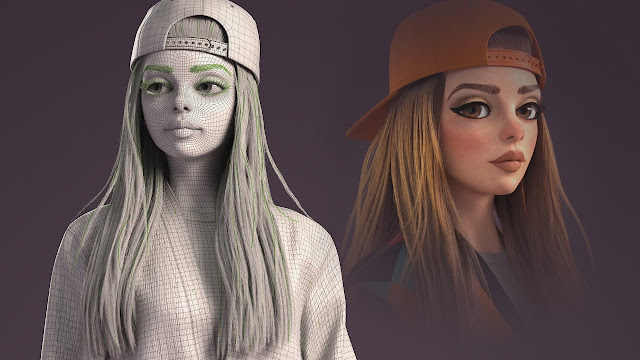
Gnomon Workshop - Creating A Stylized Female Character - The Making of Lyn-Z with Crystal Bretz

In this tutorial Senior Character/Creature Modeler Crystal Bretz takes you through her entire workflow for creating a stylized female cha...